コラム


はじめに
こんにちは、クラウドCoEの熊谷です。
BTCでは4月から2か月間新卒研修を実施します。
62人の新卒にIAMユーザーを付与することになりますので、その作業を自動化するLambdaを作成しました。
作成したLambdaの仕様
- S3バケットにアップロードされた新卒の情報を格納したCSVファイル※を読み込む
- IAMユーザーを作成し、特定のIAMグループに所属させる
- SESでそれぞれの新卒にユーザー名とパスワードを記載したメールを飛ばす
- S3バケットのCSVファイルを削除する
- Lambdaが異常終了したら、管理者にSNSでメールを飛ばす
※CSVはヘッダー無しで、[IAMユーザー名,IAMグループ名,新卒のメールアドレス]を含むものとします
文字コードはUTF-8です。
5人の新卒を、developersというIAMグループに所属する形で作成する場合のCSVの記入例です。
メールアドレスは認証情報をSESで飛ばすために利用します。
test.user,developers,[email protected]
test.user2,developers,[email protected]
test.user3,developers,[email protected]
test.user4,developers,[email protected]
test.user5,developers,[email protected]
作成手順概要
作成手順はこのようになっています。
- 新卒IAMユーザーが所属するIAMグループを事前に作成する(説明割愛)
- 東京リージョンのSESをサンドボックス解除する(説明割愛)
- Systems ManagerのパラメータにLambdaで利用するパラメータを設定する
- S3バケットを作成する
- 管理者にメールを送信するSNSを作成する
- Lambdaが使うIAMロールをCloudFormationで作成する
- Lambdaを作成する
なお、今回はCloud9で自分の勉強のためにpytestをしながら実装してみました。
デプロイもSAMを使わずにCloud9から行っています。そのため、Lambdaをデプロイする為のテンプレートは作成していません。
LambdaのソースはGitで公開していますし、ブログにも記載しますので、参考にしていただけたらと思います。
※pythonは好きなのですが勉強中なのでコードが見苦しいかもしれません。
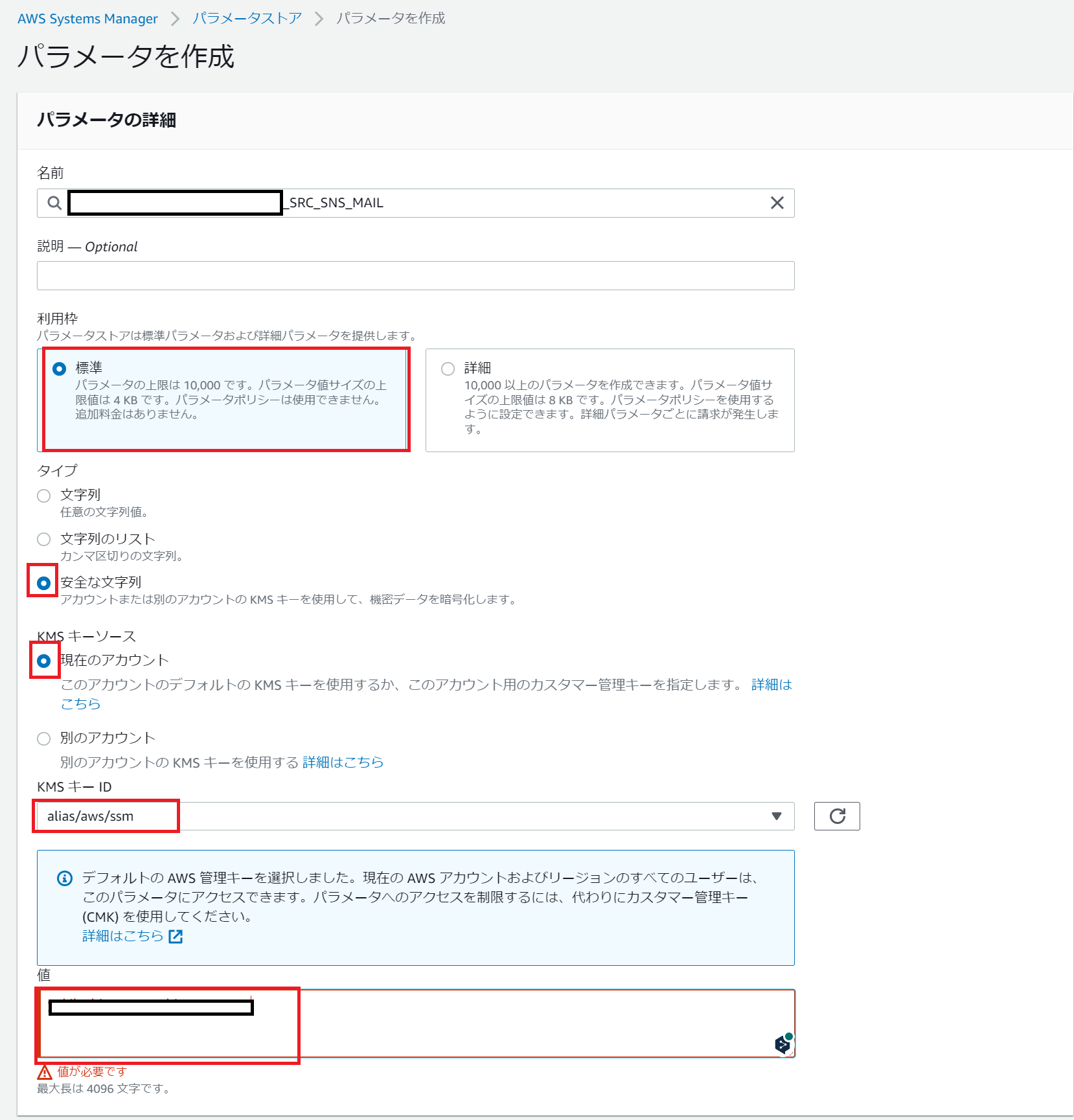
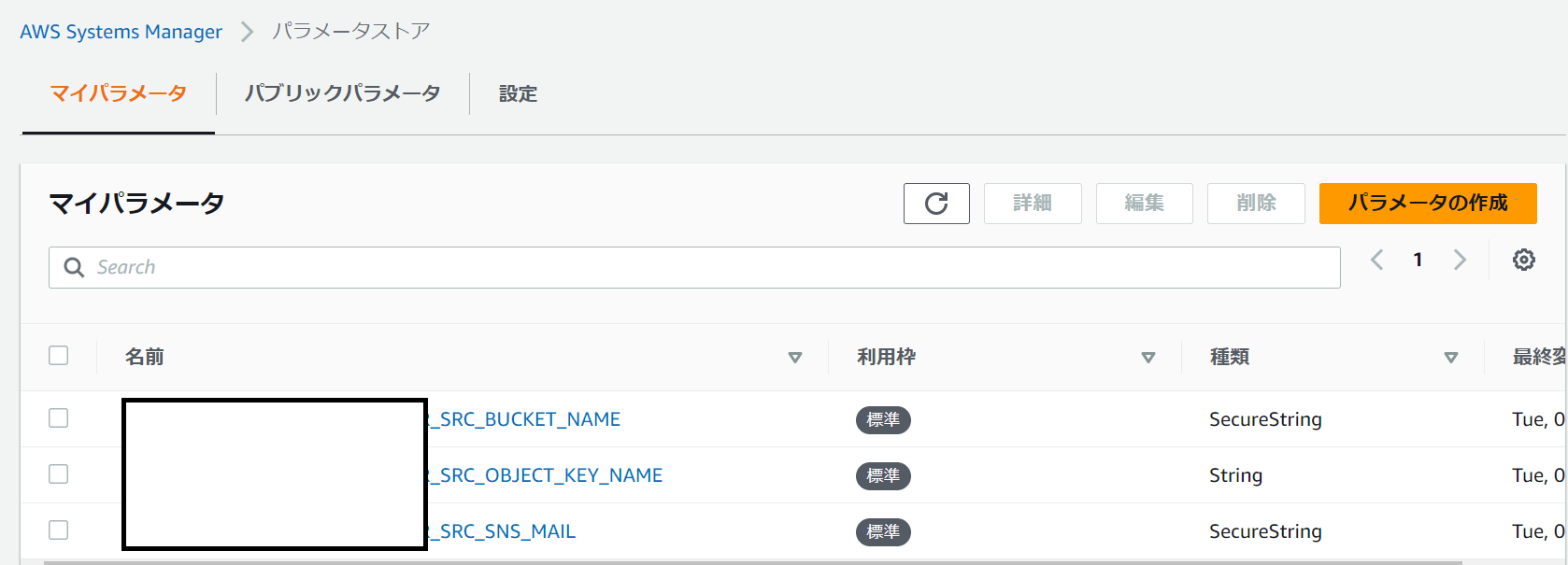
作成手順①:Systems Managerのパラメータ設定
一部SecureStringで作成するので、CloudFormationではなく手作業で作成します。

※Keyの値は任意ですが、Lambdaで指定する値になるのでメモしておきます。
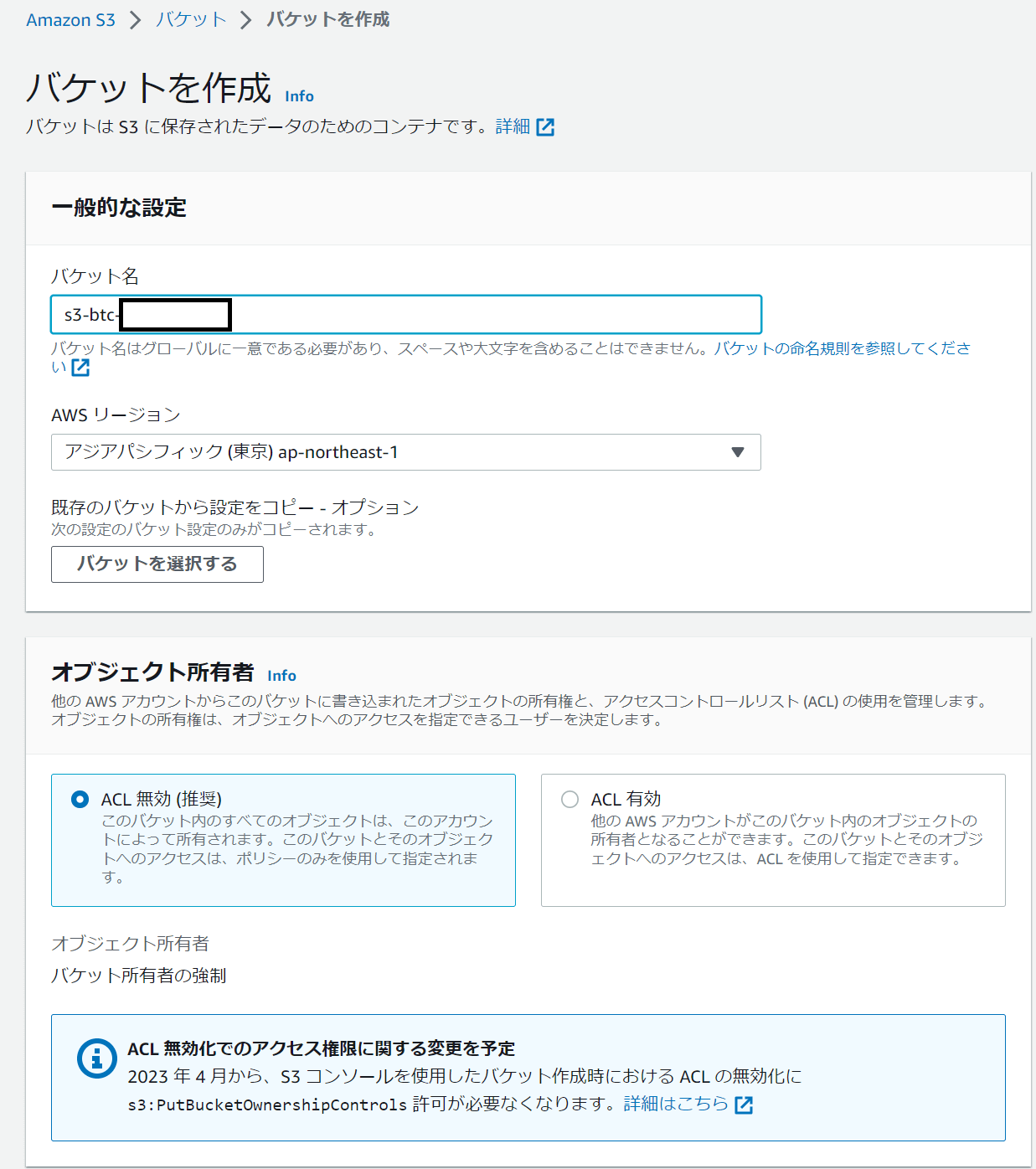
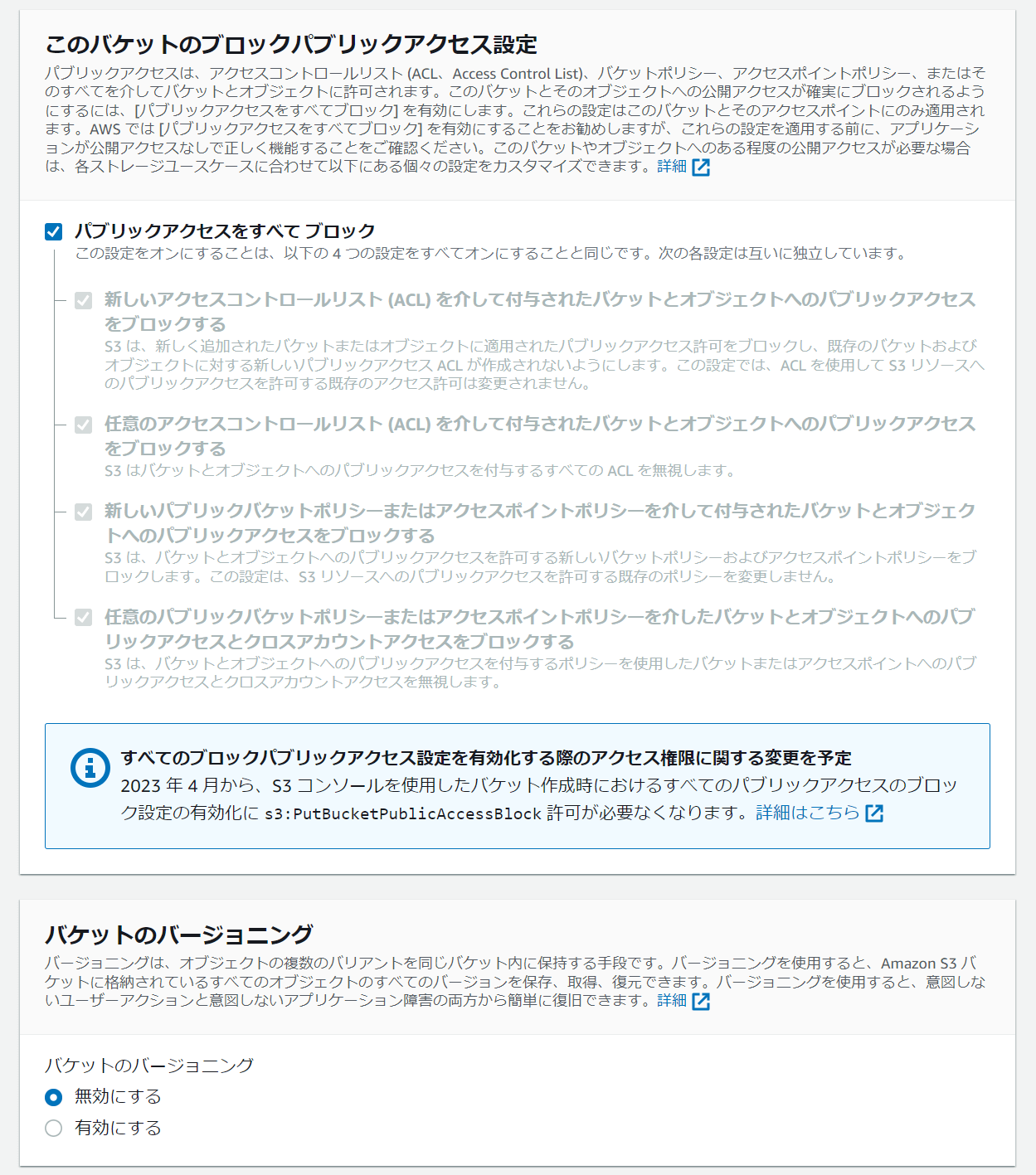
作成手順②:S3バケットの作成
SSMパラメータで設定したバケット名でS3バケットを作成します。
パラメータは全てデフォルト値のままでOKです。
作成手順③:管理者にメールを送信するSNSを作成する
SNSのトピックを作成します。
タイプ:スタンダード
名前:任意(LambdaやCloudFormationで指定する名前になるので、メモしておきます)
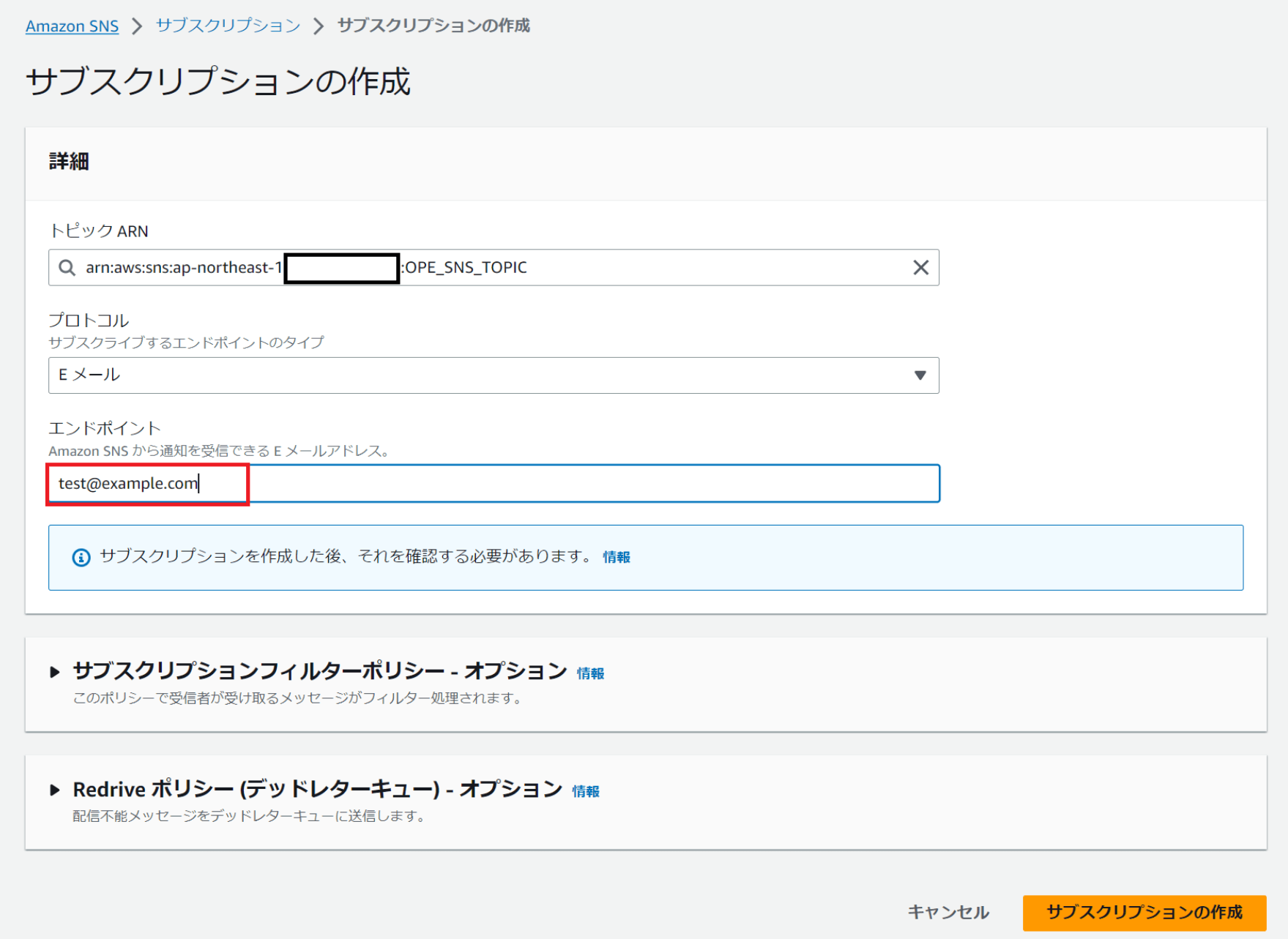
SNSトピックを作ったら、サブスクリプションを作成します。
Lambdaの異常終了時にメールを受け取るためのアドレスを記載します。
作成手順④:Lambdaが使うIAMロールをCloudFormationで作成する
以下のCloudFormationテンプレートを使ってIAMロールを作成します。
AWSTemplateFormatVersion: '2010-09-09'
Description: 'IAMロール'
Parameters:
  BucketName:
    Type: String
  SNSName:
    Type: String
Resources:
  LambdaExecutionRole:
    Type: AWS::IAM::Role
    Properties:
      RoleName: IAMRole-Lambda-CreateIAMUser
      AssumeRolePolicyDocument:
        Version: '2012-10-17'
        Statement:
        - Effect: Allow
          Principal:
            Service:
            - lambda.amazonaws.com
          Action:
          - sts:AssumeRole
      Path: /
      Policies:
      - PolicyName: policy-iam
        PolicyDocument:
          Version: '2012-10-17'
          Statement:
          - Effect: Allow
            Action:
            - iam:AttachUserPolicy
            - iam:DetachUserPolicy
            - iam:AddUserToGroup
            - iam:CreateAccessKey
            - iam:CreateUser
            - iam:GetUser
            - iam:CreateLoginProfile
            Resource: '*'
      - PolicyName: policy-log
        PolicyDocument:
          Version: '2012-10-17'
          Statement:
          - Effect: Allow
            Action:
            - logs:CreateLogStream
            - logs:PutLogEvents
            Resource: '*'
      - PolicyName: policy-s3-bucket
        PolicyDocument:
          Version: '2012-10-17'
          Statement:
          - Effect: Allow
            Action:
            - s3:ListBucket
            - s3:GetBucketLocation
            Resource: !Sub arn:aws:s3:::${BucketName}
      - PolicyName: policy-s3-bucket-object
        PolicyDocument:
          Version: '2012-10-17'
          Statement:
          - Effect: Allow
            Action:
            - s3:GetObject
            - s3:DeleteObject
            Resource:
            - Fn::Join:
              - ""
              - - !Sub arn:aws:s3:::${BucketName}
                - "/*"
      - PolicyName: policy-sns
        PolicyDocument:
          Version: '2012-10-17'
          Statement:
          - Effect: Allow
            Action:
            - sns:Publish
            Resource: !Sub arn:aws:sns:${AWS::Region}:${AWS::AccountId}:${SNSName}
      - PolicyName: policy-ses
        PolicyDocument:
          Version: '2012-10-17'
          Statement:
          - Effect: Allow
            Action:
            - ses:SendRawEmail
            - ses:SendEmail
            Resource: '*'
      - PolicyName: policy-ssm
        PolicyDocument:
          Version: '2012-10-17'
          Statement:
          - Effect: Allow
            Action:
            - ssm:GetParameters
            - ssm:GetParameter
            - ssm:DescribeParameters
            Resource: !Sub arn:aws:ssm:${AWS::Region}:${AWS::AccountId}:parameter/*
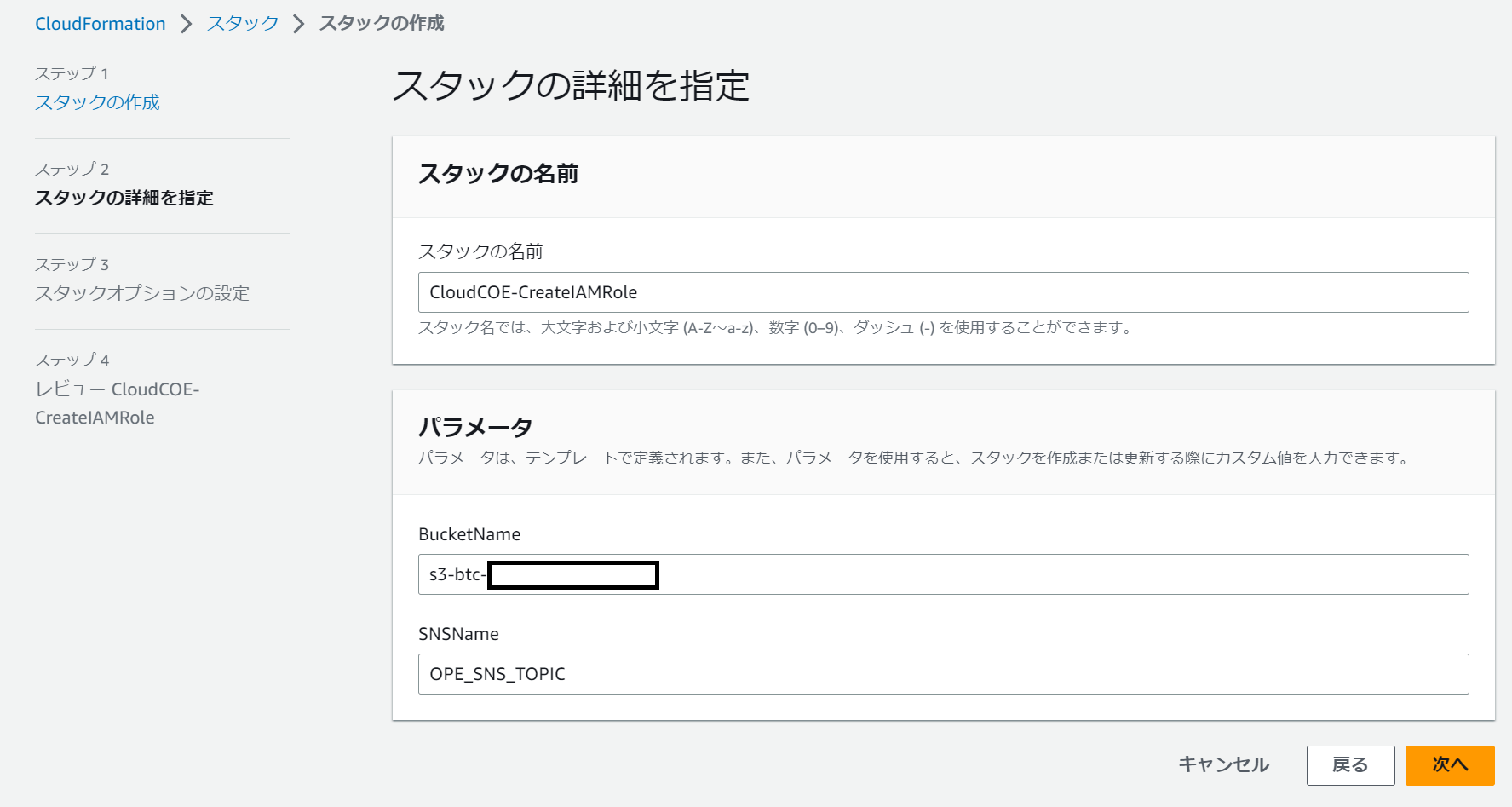
上記のテンプレートを使ってスタックを作ります。
作成手順⑤:Lambdaを作成する
Lambdaのソースコードはこちらに置いています。⇒Lambdaのソース
英語が苦手な人の為に、日本語のメールが配信されるようにテンプレートを用意しました。
またLambda自体が何らかの理由で異常終了したにもメールを配信するようにします。
【Lambdaの構成】
createIAMUser
┣━lambda_function.py
┗━mail_template
┣━user_mail_template.txt ←新卒に送るSESのメールテンプレート
┗━error_mail_template.txt ←Lambda自体が異常終了した際に送信するSNSのテンプレート
以下はlambda_function.pyの記載です。
import boto3
import botocore
import json
import io
import csv
import random
import string
import datetime
error_mail_template = './mail_template/error_mail_template.txt'
mail_template = './mail_template/user_mail_template.txt'
REGION="ap-northeast-1"
sns = boto3.client('sns',region_name=REGION)
iam = boto3.client('iam')
s3 = boto3.client('s3',region_name=REGION)
ses = boto3.client('ses',region_name=REGION)
ssm = boto3.client('ssm',region_name=REGION)
ERROR_SNS_TOPIC="OPE_SNS_TOPIC"
SUBJECT="Your IAM User has been registered."
def get_random_password():
    """
    処理内容:パスワード作成
    Returns
    --------
    shuffled_password : string
    パスワード
    """
    random_source = string.ascii_letters + string.digits
    password = random.choice(random_source)
    for i in range(3):
        password += random.choice('!@#$%&*_+-=|')
        password += random.choice(string.ascii_lowercase)
        password += random.choice(string.ascii_uppercase)
        password += random.choice(string.digits)
    shuffled_password = ''.join(
        random.sample(password, len(password)))
    return shuffled_password
def get_account_id():
    """
    処理内容:AWSアカウントIDの取得
    Returns
    --------
    AccountIDの情報: str
        ex)123456789012
    """
    res = boto3.client('sts').get_caller_identity()
    account_id = res['Account']
    return account_id
def delete_object(SRC_BUCKET_NAME,SRC_OBJECT_KEY_NAME):
    """
    処理内容:S3からCSVを削除
    Parameters
    ----------
    S3のバケット名 : str
    S3のオブジェクト名 : str
    """
    try:
        s3.delete_object(
          Bucket=SRC_BUCKET_NAME,
          Key=SRC_OBJECT_KEY_NAME
          )
    except Exception as e:
        send_error_sns(str(e))
        raise e
def get_ssm_param(param):
    """
    処理内容:SSMパラメータの取得
    Parameters
    ----------
    パラメータのKey : str
    Returns
    --------
    SSM ParameterのValue: str
    """
    try:
        response = ssm.get_parameter(
            Name=param,
            WithDecryption=True
            )
    except Exception as e:
        send_error_sns(str(e))
        raise e
    return response['Parameter']['Value']
def get_csv(SRC_BUCKET_NAME,SRC_OBJECT_KEY_NAME):
    """
    処理内容:S3に配置したCSVからIAM作成対象を読み込む
    Returns
    --------
    S3の情報 : list
    IAM作成対象のlist
    ex)['test.user,testgroup', 'test.user2,testgroup2',…]
    """
    try:
        src_obj = s3.get_object(
            Bucket = SRC_BUCKET_NAME,
            Key = SRC_OBJECT_KEY_NAME,
            )
    except botocore.exceptions.ClientError as e:
        if e.response['Error']['Code'] == "NoSuchKey":
            print(f"{SRC_OBJECT_KEY_NAME} does not exist")
            send_error_sns(str(e))
    except Exception as e:
        send_error_sns(str(e))
        raise e
    csv_list = src_obj['Body'].read().decode("utf-8").split()
    return csv_list
def create_iamuser(csv_list):
    """
    処理内容:IAMユーザーを作成する
    Parameters
    ----------
    S3の情報 : list
    IAM作成対象のlist
    ex)['test.user,testgroup,[email protected]', 'test.user2,testgroup2,[email protected]',…]
    """
    try:
        for row in csv_list:
            user_info = row.split(',')
            temp_password = get_random_password()
            iam.create_user(
                UserName=user_info[0]
                )
            waiter_config = {
                'Delay': 3,
                'MaxAttempts': 5
            }
            waiter = iam.get_waiter('user_exists')
            waiter.wait(
                UserName=user_info[0],
                WaiterConfig=waiter_config
                )
            iam.create_login_profile(
                UserName=user_info[0],
                Password=temp_password,
                PasswordResetRequired=True
                )
            iam.add_user_to_group(
                GroupName=user_info[1],
                UserName=user_info[0]
                )
            send_ses(user_info,temp_password)
    except Exception as e:
        send_error_sns(str(e))
        raise e
def set_mail_content(user_info,temp_password):
    """
    SESメールで送信する内容を修正
    Parameters
    ----------
    error : str
      error message when error occurs
    lambda_name : str
    """
    with open(mail_template) as f:
        ses_body = f.read()
    ses_body = ses_body.replace('var_username', user_info[0])
    ses_body = ses_body.replace('var_password', temp_password)
    return ses_body
def send_ses(user_info,temp_password):
    """
    ユーザーにパスワードを送信するメール
    Parameters
    ----------
    S3の情報 : list
        IAM作成対象のlist
        ex)['test.user,testgroup,[email protected]']
    初回パスワード:str
    """
    ses_body = set_mail_content(user_info,temp_password)
    try:
        SOURCE_MAIL = get_ssm_param('SRC_SNS_MAIL')
        response = ses.send_email(
          Destination={
              'ToAddresses': [
                  user_info[2],
              ],
          },
          Message={
              'Body': {
                  'Text': {
                      'Charset': 'UTF-8',
                      'Data': ses_body,
                  },
              },
              'Subject': {
                  'Charset': 'UTF-8',
                  'Data': SUBJECT,
              },
          },
          Source=SOURCE_MAIL
        )
    except Exception as e:
        send_error_sns(str(e))
        raise e
def send_error_sns(error):
    """
    Lambdaが異常終了した際にSNSメールを送信
    Parameters
    ----------
    error : string
      error message when error occurs
    """
    now = datetime.datetime.now() + datetime.timedelta(hours=9)
    now = now.strftime('%Y/%m/%d %H:%M:%S')
    with open(error_mail_template) as f:
        data_lines = f.read()
    data_lines = data_lines.replace('ver_error_date', now)
    data_lines = data_lines.replace('ver_error', error)
    #メール文の整形
    error_sns_body = {}
    error_sns_body["default"] = data_lines + "\n"
    #送信先SNSトピックの指定
    ACCOUNT_ID = get_account_id()
    topic = 'arn:aws:sns:ap-northeast-1:'+ ACCOUNT_ID + ':' + ERROR_SNS_TOPIC
    #メール件名の指定
    subject = '[Lambda Error] [新卒研修アカウント]IAMユーザー作成Lambda'
    #SNSへのパブリッシュ
    try:
        response = sns.publish(
            TopicArn = topic,
            Message = json.dumps(error_sns_body, ensure_ascii=False),
            Subject = subject,
            MessageStructure='json'
      )
    except Exception as e:
        print(str(e))
        raise e
def lambda_handler(event, context):
    SRC_BUCKET_NAME = get_ssm_param('SRC_BUCKET_NAME')
    SRC_OBJECT_KEY_NAME = get_ssm_param('SRC_OBJECT_KEY_NAME')
    csv_list = get_csv(SRC_BUCKET_NAME,SRC_OBJECT_KEY_NAME)
    create_iamuser(csv_list)
    delete_object(SRC_BUCKET_NAME,SRC_OBJECT_KEY_NAME)
以下はuser_mail_template.txtの記載です。
おつかれさまです。クラウドCoEです。
新卒研修で利用するAWSアカウント情報です。
ログイン URLは別途皆さんに連携します。
IAM User:var_username
Password:var_password
ログイン後は必ずMFAを設定してください
以下はerror_mail_template.txtの記載です。
CoEチーム各位
Lambdaが異常終了しました。
ご確認をお願い致します。
【発生時刻】ver_error_date
【エラー内容】
 ver_error
こちらはLambdaのキャプチャです。
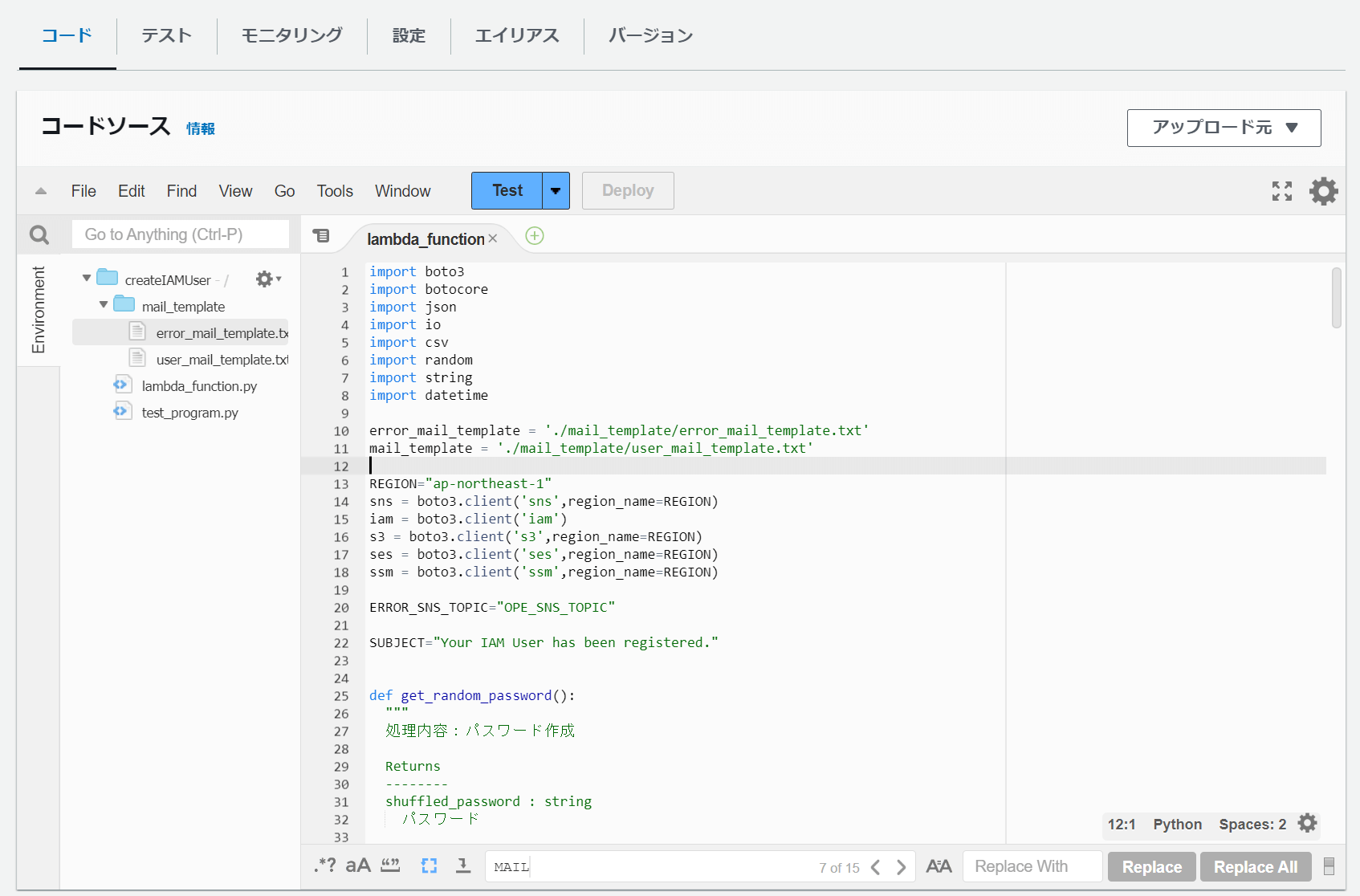
※Cloud9でpytestをしながら実装したので、上記の画面上ではtest_program.pyがありますが、なくてもLambdaは動きます
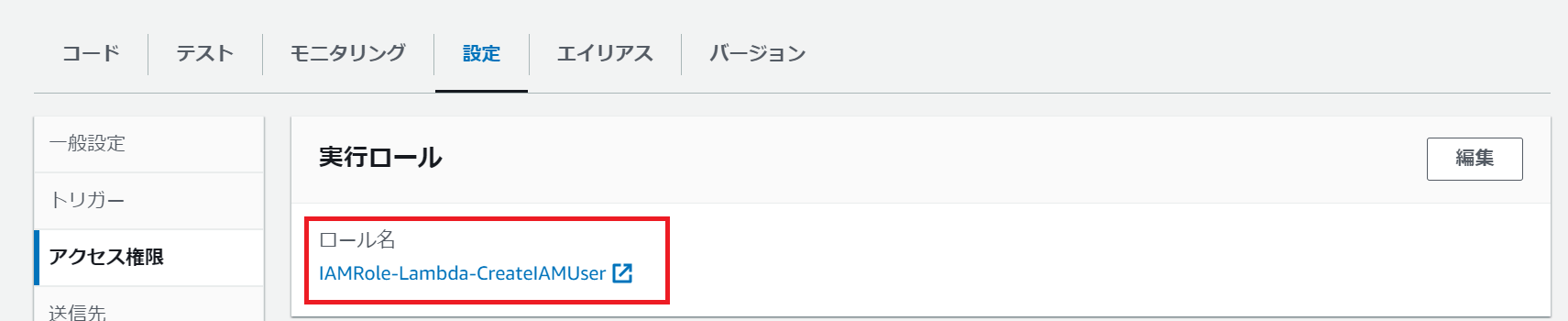
Lambdaを作成する際、CloudFormationで事前に作成したIAMロールを設定します。
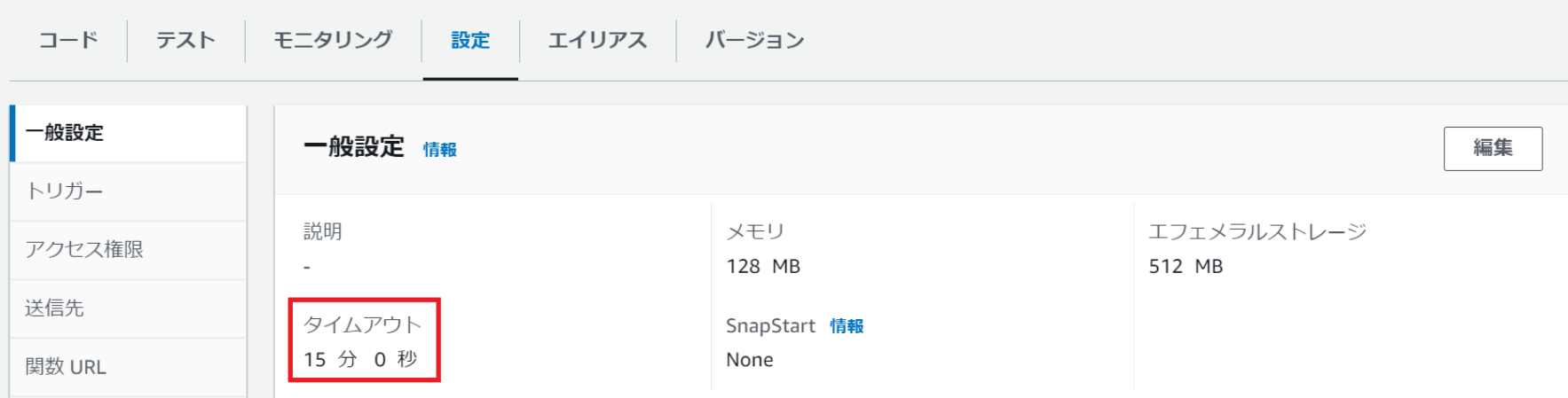
またタイムアウト時間を長めに設定します。
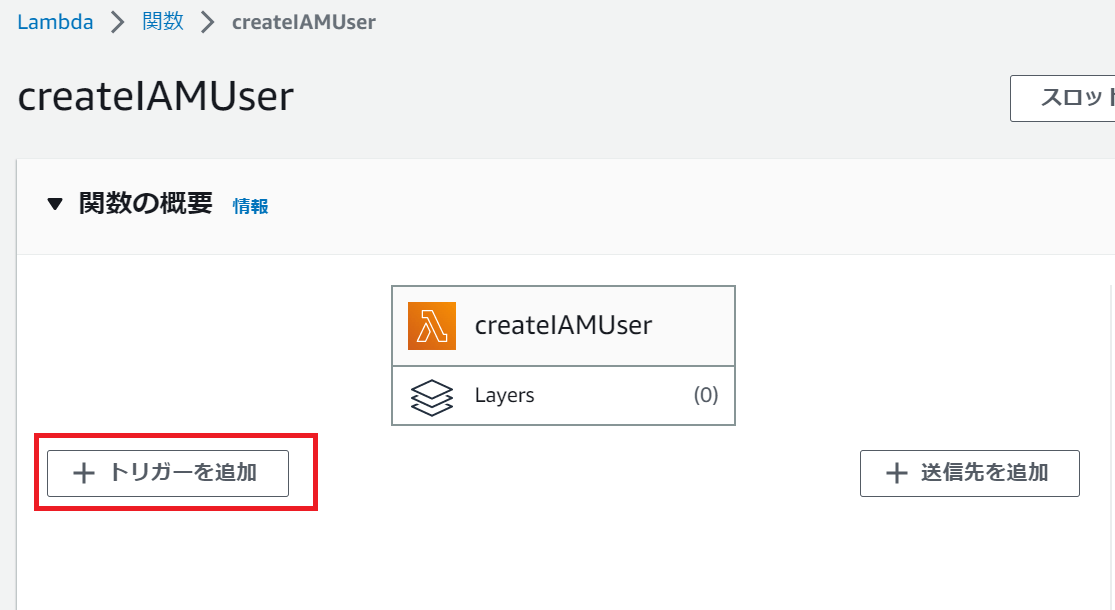
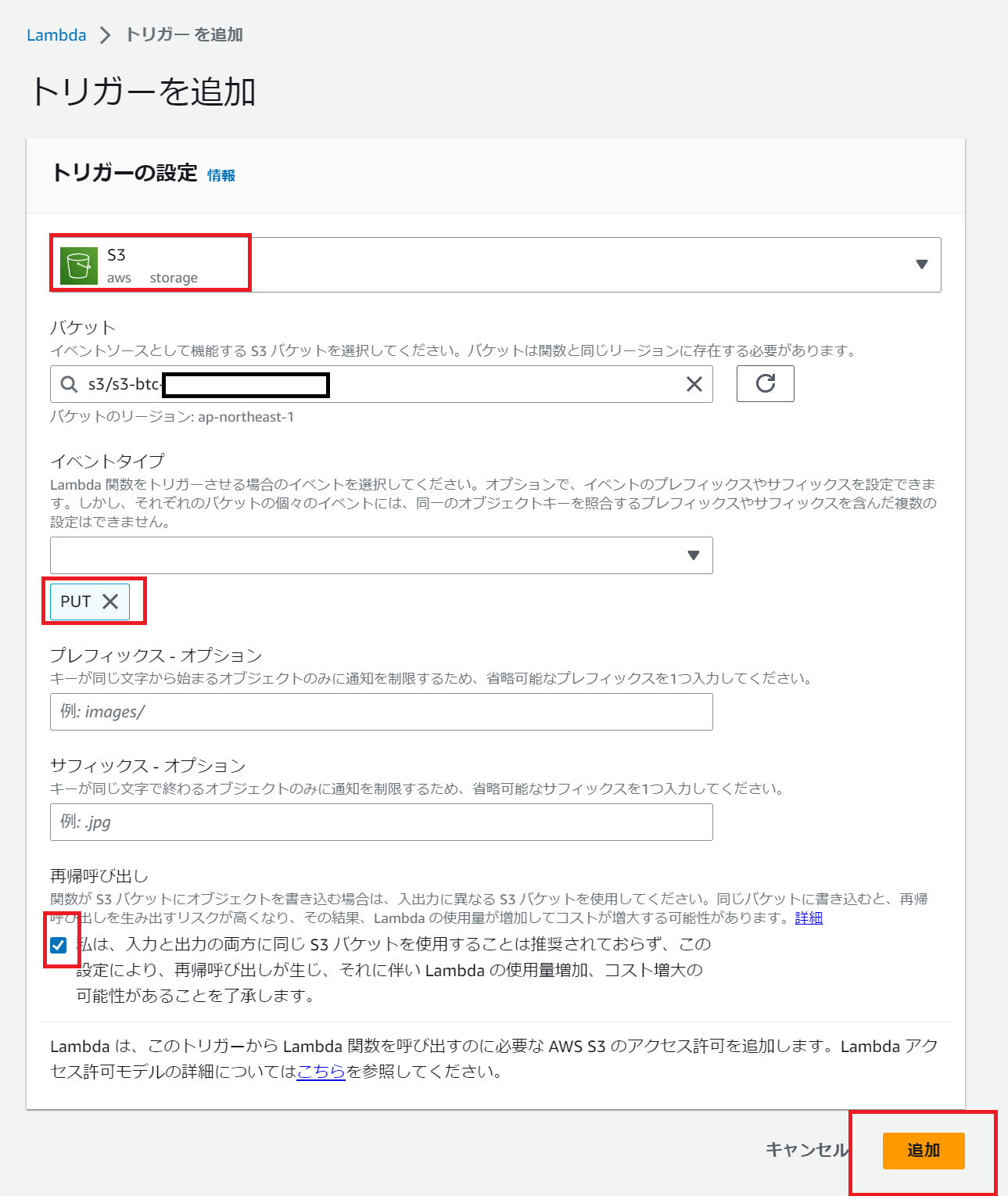
最後に、S3バケットにCSVがアップロードされたらLambdaが動くように、S3トリガーを追加します。
作業は以上になります!
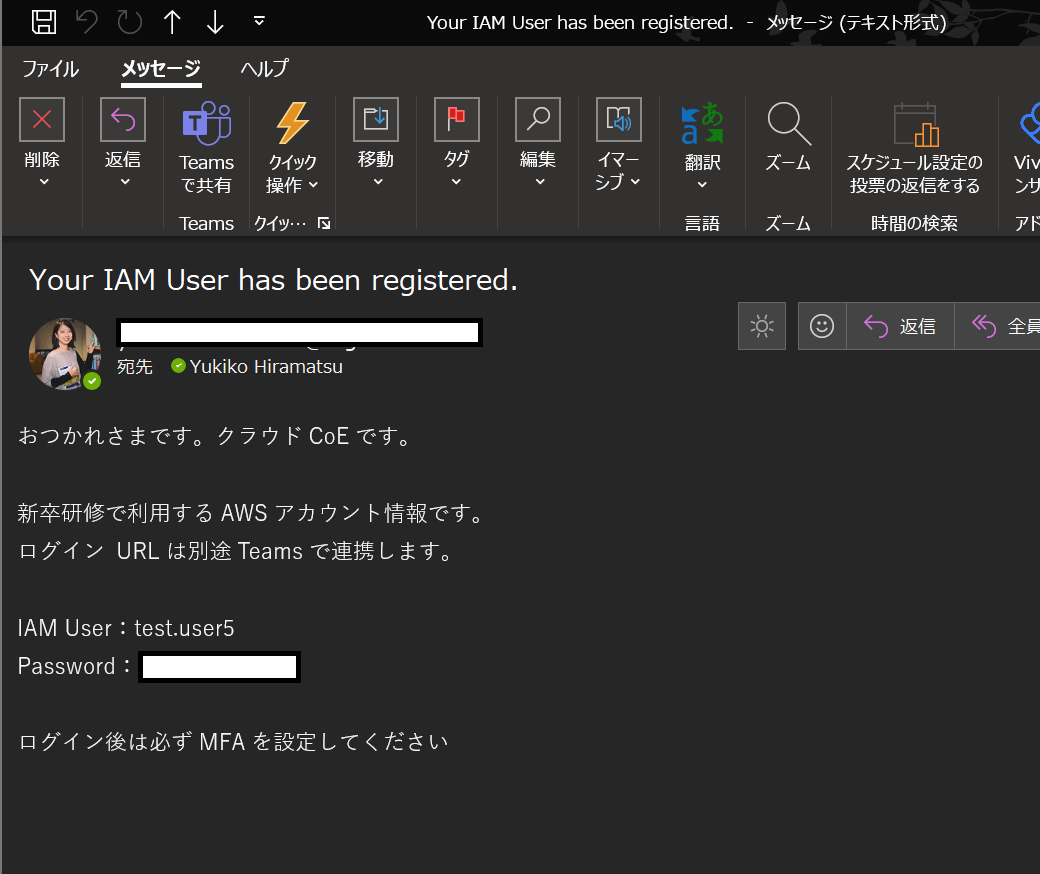
S3バケットにCSVを配置したら、このようなメールが届くと思います。
-
PICK UP
ピックアップ
-
ピックアップコンテンツがありません
-
RANKING
人気の記事
-
-
1
公共システムのコスト見直しのアプローチと調達仕様書…
公共システムのコスト見直しのアプローチと調達仕様書への記載事項(AWS Comp…
2023/12/21
-
2

インターネットと通信しないVPC内にAWS Sto…
インターネットと通信しないVPC内にAWS Storage Gatewayを構築…
2021/02/01
-
3
Amazon S3を使用したAMIの保存(エクスポ…
Amazon S3を使用したAMIの保存(エクスポート)と復元(リストア)を試し…
2022/10/31
-
4

Infrastructure as Codeを理解…
Infrastructure as Codeを理解する(第1回)
2020/04/15
-
5
クラウド移行とモダン化の考え方
クラウド移行とモダン化の考え方
2023/05/23
-
-
ARCHIVE
アーカイブ
-
- January 2024 (1)
- December 2023 (2)
- June 2023 (2)
- May 2023 (1)
- April 2023 (1)
- March 2023 (2)
- February 2023 (2)
- January 2023 (1)
- December 2022 (2)
- October 2022 (2)
- September 2022 (2)
- August 2022 (1)